Want to see yourself with your dream bike or posing next to a superbike in a cinematic angle image, without spending a rupee or learning Photoshop? With ChatGPT’s AI image generation, you can create stunning, personalised bike images for free in just a few minutes. Whether you want a cool social media profile picture, a bike-themed WhatsApp DP, or just want to visualise your dream ride, this guide is for you.
Why Create Bike Images with ChatGPT?
- Completely Free: No need for paid apps or subscriptions.
- Personalised: Use your own photo and favourite bike model.
- Trending: Bike edits are hot right now on Instagram and YouTube.
- Fun & Fast: Get creative results in seconds.
Step 1: Choose or Click Your Photo
- Pick a clear, well-lit photo where your face is visible.
- For best results, use a selfie or portrait with a neutral background.
Step 2: Prepare Your Bike Prompt for ChatGPT
Here are some sample prompts you can use (customise with your favourite bike model, style, and scene):
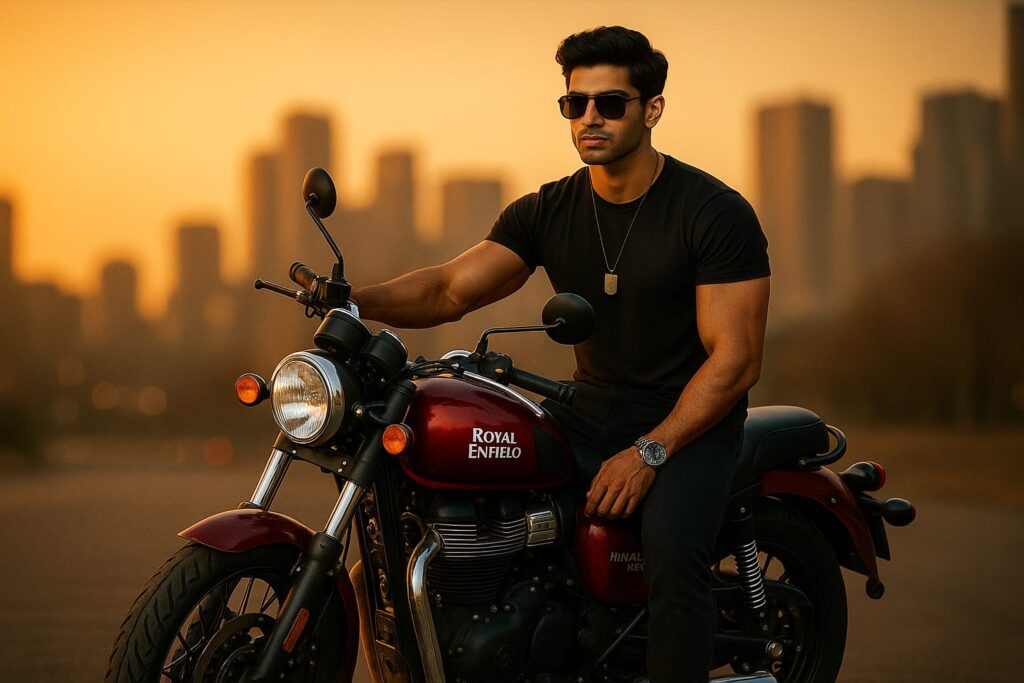
Prompt 1:
A rugged, well-groomed man with a muscular build and sunglasses poses confidently on a Himalayan Rock Red Royal Enfield in a modern city at sunset. Wearing a half sleeve black t-shirt with black jeans plus red boots, a silver watch, black beaded bracelet, and dog tag, he gazes into the distance. The scene is ultra-realistic 4K, with warm sunset light and a softly blurred urban backdrop, styled like the reference image.
Prompt 2:
A highly realistic and cinematic portrait of a confident, muscular man sitting on a Royal Enfield motorcycle at sunset. He’s wearing a fitted black t-shirt, dark jeans, sunglasses, and a metallic dog tag necklace. The lighting is warm and golden, casting long shadows and highlighting the contours of his face and arms. The background features a softly blurred city skyline, adding depth and drama. The atmosphere is calm but intense, evoking a feeling of freedom, strength, and quiet power. Shot with a shallow depth of field, high contrast, and rich, warm tones for a moody, cinematic look.
Prompt 3:
Make a stylish image of me riding a [Kawasaki Ninja H2] on a racetrack, with motion blur and speed lines. I’m in a green racing suit and helmet, leaning into a turn. The background is a dynamic racetrack with cheering crowds.
Prompt 4:
Create a cool portrait of me with a [Harley-Davidson Fat Boy] parked in a neon-lit city at night. The bike is jet black with chrome, and I’m wearing sunglasses and a denim jacket, arms crossed. Add neon reflections and a cinematic vibe.
Prompt 5:
Generate a fun image of me and my friends with three different bikes (Ducati, KTM, Yamaha) in a roadside café setting. Everyone is laughing, and the scene has a warm, golden-hour glow.
Step 3: Generate Your Image with ChatGPT
- Open ChatGPT (with image generation enabled).
- Upload your photo.
- Copy and paste your chosen prompt.
- Wait for the AI to create your personalised bike image.
- Download the result.
Step 4: (Optional) Enhance with a Face Swap for Perfect Realism
Sometimes, AI-generated images may not capture your face exactly as you want. For a flawless, ultra-realistic result, use a free AI face swap tool:
How to Do a Face Swap
- Go to a free face swap tool:
- Upload your AI-generated bike image as the target photo.
- Upload a clear selfie as the source face.
- Click “Swap Face” or the equivalent button.
- Download your new image with your real face perfectly blended onto the bike scene.
These tools are fast, free, and work directly in your browser—no sign-up needed.
Step 5: Share and Go Viral
- Post your new bike image on Instagram, WhatsApp, or Facebook.
- Use it as your gaming avatar, YouTube thumbnail, or just to impress your friends.
- Try different prompts and bikes for endless creative edits!
Pro Tips
- Use high-resolution photos for best results.
- Be specific in your prompts (mention bike model, colours, outfit, background).
- Experiment with different scenes: city, mountains, race track, night, etc.
- For group edits, mention all friends and their bikes in the prompt.
Now you’re ready to create your own dream bike image for free—no Photoshop, no paid apps, just pure AI magic with ChatGPT and a quick face swap for perfection!
Also Read: