Labubu is the designer toy everyone wants in their feed, and with ChatGPT’s image generation, you can create your selfie image with a Labubu doll with ChatGPT, no Photoshop required. Whether you want a fun profile pic, a viral Instagram post, or just to join the #Labubu trend, here’s the easiest way to edit your selfie with Labubu using ChatGPT and the right prompt.
Step 1: Get Ready: What You Need
- A clear selfie (well-lit, face visible, simple background works best)
- Access to ChatGPT with image generation (web or app)
- The right prompt (see below!)
Step 2: Upload Your Selfie to ChatGPT
- Open ChatGPT (make sure you’re using a version with image editing).
- Upload your selfie—just like you’d attach a photo in chat.
Step 3: Use the Perfect Labubu Prompt
Copy and paste this detailed prompt to get a realistic Labubu Image with ChatGPT:
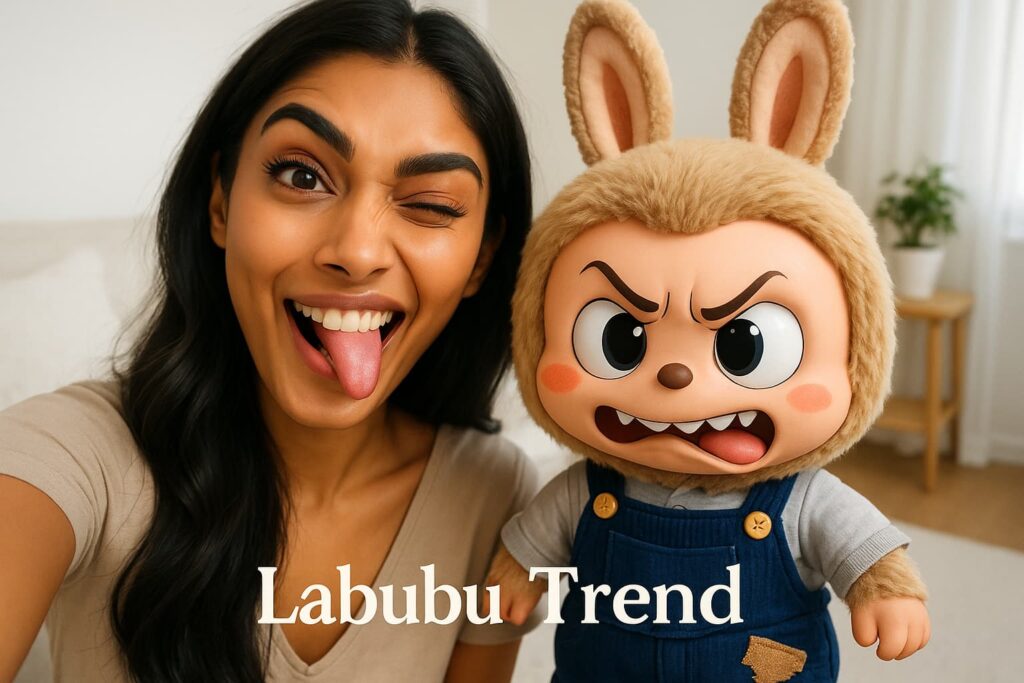
Prompt:
A highly realistic, cinematic portrait of a cute and beautiful girl (same girl as in the image) taking a selfie with a Labubu doll (same as in the image). The girl has soft, glowing skin, big expressive eyes, and a playful smile. She’s holding the Labubu doll close to her cheek, tilting her head affectionately as if cuddling it. The Labubu doll has a cheeky grin, and the girl’s expression is full of warmth and mischief, creating a heart-melting moment. She’s playfully puffing her cheeks or making a peace sign, capturing a kawaii vibe. The lighting is soft and golden-hour styled, with a dreamy bokeh background, as if taken in a cozy urban street or a sunlit bedroom. The image should feel cinematic, emotionally warm, and incredibly cute, with rich textures and depth-of-field focus.
Other prompt ideas:
- “A selfie of me sitting with a Labubu doll on my shoulder, in a cozy bedroom, soft daylight, playful vibe.”
- “A vibrant image of me and a Labubu doll at a café table, both smiling, with pastel colors and dreamy lighting.”
- “A fun group selfie with me, friends, and three different Labubu dolls, outdoors, sunny mood, candid style.”
Step 4: Generate and Download Your Labubu Selfie
- Hit “Generate” and let ChatGPT work its magic.
- Wait a few seconds for your Labubu edit to appear.
- Download your new image!
Step 5: (Optional) Face Swap for Ultra-Realism
If the AI doesn’t get your face just right, do a quick face swap for a perfect match:
- Go to a free AI face swap tool (like Artguru, Pixlr Face Swap, or FaceSwapper.ai).
- Upload your Labubu selfie as the target image.
- Upload a clear photo of your real face as the source.
- Click “Swap Face” and download the final, ultra-realistic version.
Pro Tips for Viral Labubu Edits
- Use high-res selfies for best results.
- Add details in your prompt (outfit, mood, background).
- Try different poses—holding, hugging, or sitting with Labubu.
- Share on Instagram, TikTok, or X with hashtags like #LabubuDoll #LabubuEdit #PopMart.
Why This Works
ChatGPT’s AI image tools, combined with the right prompt, can generate a selfie with Labubu that looks like a real photo shoot. The secret is in the details: mention natural lighting, clear facial features, and describe the Labubu doll’s look for a result that pops.
Inspired by the latest AI trends and collector communities, this method is fast, free, and fun, try it and join the global Labubu craze!
Related Posts:
How to Create a Selfie with Your Favourite Cartoon Characters Using ChatGPT