Want to see yourself as a Squid Game player or guard? With ChatGPT’s image generation, you can turn your selfie into a Squid Game-inspired photo in seconds, no design skills or paid apps needed. Here’s a step-by-step guide, the best prompts, and pro tips to get a viral-worthy Squid Game image for your social media or profile.
Step 1: Prepare Your Selfie
- Choose a clear, well-lit photo where your face is visible.
- For best results, use a neutral background and a natural expression.
Step 2: Open ChatGPT and Upload Your Image
- Go to the ChatGPT app or website (make sure you’re using a version with image editing).
- Log in and start a new chat.
- Click the media/upload button and add your selfie.
Step 3: Use a Squid Game Prompt
Copy and paste one of these detailed prompts into ChatGPT’s prompt box. These are designed to preserve your face while transforming the rest of the image into the Squid Game universe:
Prompt 1: Player Transformation
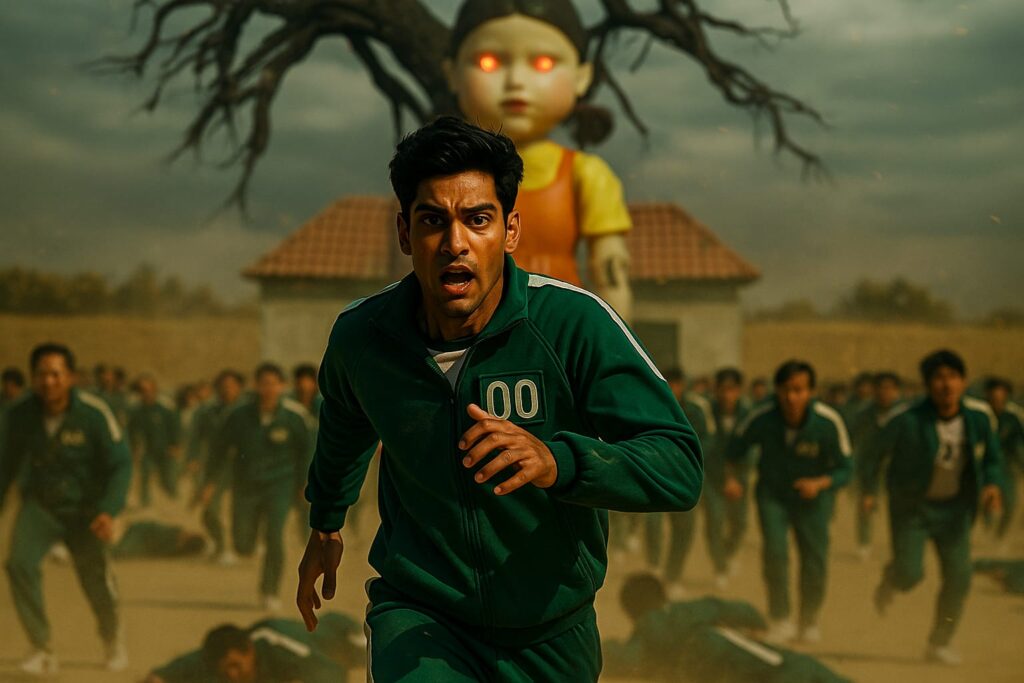
Ultra-realistic 8K action scene of the same man (as in the image) running in panic across the Squid Game “Red Light, Green Light” arena. He wears a green tracksuit with number 00, surrounded by hundreds of other players frozen in fear or sprinting. The giant creepy doll looms in the background, her eyes glowing red.The bright playground field contrasts with a deadly, tense atmosphere. Dust, motion blur, and scattered bodies emphasize the chaos. Cinematic lighting and dramatic energy.
Prompt 2: Guard Transformation
A dramatic, high-resolution action scene of a man in a green tracksuit running in fear during a deadly survival game. Behind him, a giant doll with glowing red eyes looms ominously, while a crowd of contestants runs in panic. Dust rises, tension is high, and the atmosphere is intense. Cinematic lighting, dynamic motion blur, and detailed expressions capture the chaos and urgency.
Prompt 3: Group Selfie
Create an ultra-realistic group selfie in Squid Game style. Keep all faces unchanged. Everyone is wearing Squid Game tracksuits with different player numbers. The background is the outdoor playground from the first game, with the giant doll visible in the distance. Add suspenseful lighting and a cinematic color palette.
Prompt 4: Creative Concept
Transform my image into a Squid Game character. Maintain my facial features exactly. Dress me in a green tracksuit with a unique player number, and set the background in the iconic Squid Game staircase with bold, surreal colors and geometric shapes. Make the atmosphere intense and mysterious.
Step 4: Generate and Download Your Image
- Click “Generate” and let ChatGPT process your Squid Game Image prompts.
- Review the result. If you want a different vibe, tweak the prompt (change the background, lighting, or character role).
- Download your new Squid Game image.
Step 5: (Optional) Enhance with a Face Swap
If the AI doesn’t get your face exactly right, use a free face swap tool for extra realism:
- Go to a site like Artguru, Pixlr Face Swap, or FaceSwapper.ai.
- Upload your Squid Game image as the target.
- Upload your real selfie as the source.
- Click “Swap Face” and download the final, ultra-realistic version.
Pro Tips for Viral Squid Game Edits
- Use high-res selfies for best results.
- Be specific in your prompt (player or guard, background, lighting).
- Try different scenes: arena, staircase, playground, or dormitory.
- Share your creation with #SquidGameAI or #SquidGameEdit for maximum reach.
This method is based on the latest AI image trends and prompt engineering for ChatGPT. Try it out and join the Squid Game craze with your own unique twist!
Also Read:
How to Create a Cinematic Image Using Sora in ChatGPT (Free & Fast)