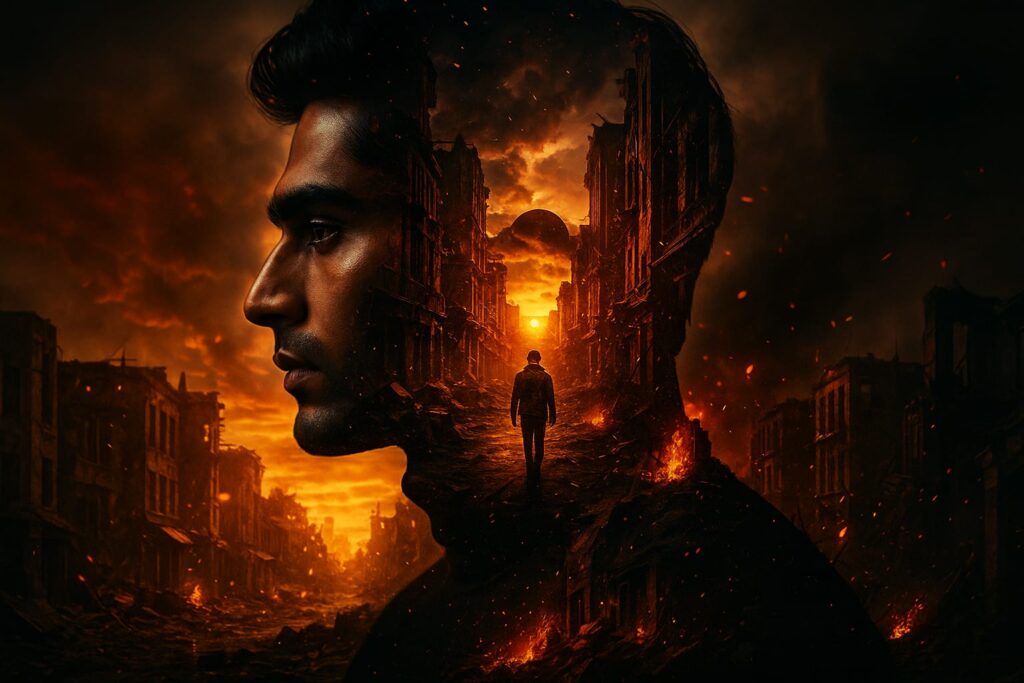
This striking image is a perfect example of how AI art is redefining digital storytelling. At first glance, you see a silhouette, within it, a lone figure walks down a fiery, apocalyptic street as the sun sets through ruined buildings, embers swirling in the air. The outer darkness and inner blaze create an AI movie poster effect, blending portrait and landscape into a single, dramatic narrative.
How Was This Image Made?
This type of cinematic double exposure is easier to create than ever, thanks to AI image generators like ChatGPT (with image features enabled), Midjourney, or Sora. Here’s how you can make a similar artwork, even if you have zero editing experience:
Step 1: Choose Your Photos
- Portrait: Start with a high-contrast side profile or silhouette photo of yourself or your subject.
- Background Scene: Pick a dramatic landscape (like a ruined city, burning street, or sunset) that tells a story or sets a mood.
Step 2: Craft Your AI Prompt
Here’s a sample prompt for AI movie poster you can use with ChatGPT or your favorite AI art tool:
Prompt 1:
A cinematic double exposure of a man (Same person as in image) in profile, with a post-apocalyptic cityscape inside his silhouette. The inner scene shows the man walking through a destroyed, burning urban street, buildings in ruins, glowing embers and fire, with a dramatic sunset in the background. Moody lighting, warm tones, emotional and introspective mood, high detail, 8K resolution
Prompt: 2
A surreal, cinematic double exposure of a man’s side profile blending seamlessly with a post-apocalyptic city street at sunset. Inside his silhouette, a lone figure walks toward a burning horizon, surrounded by crumbling buildings and embers floating through the air. Rich orange and red tones, dramatic lighting, and moody atmosphere convey a sense of inner journey, loss, and resilience.
Tips for Prompts:
- Mention “double exposure,” “cinematic,” “high contrast,” and the mood you want (apocalyptic, hopeful, mysterious).
- Specify lighting (sunset, glowing embers), composition (silhouette, inner landscape), and resolution.
Step 3: Generate the Image
- Upload your chosen photos if your AI tool allows, or let the AI generate both elements from your prompt.
- Review the result. If needed, tweak your prompt for more detail, different lighting, or a new background.
Step 4: Fine-Tune for Maximum Impact
- Use AI editing tools to adjust color grading (teal/orange for cinematic feel), add film grain, or enhance contrast.
- Crop to a widescreen or poster format for extra drama.
Step 5: Download and Share
- Save your masterpiece in high resolution.
- Share on Instagram, Pinterest, or use as a desktop wallpaper or digital art print.
Why This Style Works
Double exposure art like this is trending because it fuses emotion, story, and style in one frame. It’s perfect for music covers, movie posters, or anyone wanting to express a journey, struggle, or transformation visually.
Pro Tips
- Try different inner scenes: cityscapes, forests, cosmic skies, or even abstract patterns.
- Use keywords like “moody,” “cinematic lighting,” “storytelling,” and “film grain” for the best results.
- For a personal touch, use your own silhouette and a background that means something to you.
Want to create your own cinematic double exposure?
Open ChatGPT or your favorite AI art generator, use the prompt above, and start experimenting. You’ll be amazed at how easily you can turn imagination into a movie-worthy image, no Photoshop needed.
Also Read:
How to Create an Cinematic Image with Your Favourite Bike with ChatGPT?